CitiGuide
: Flutter City Explorer App

Project Overview
CitiGuide is a Flutter-based mobile application designed to transform how users discover and navigate their cities. Built using Flutter and Dart on the frontend with Supabase handling authentication, database, and storage on the backend, the app delivers a lightweight yet fully capable city exploration experience across Android, iOS, and web.
The app guides users through a thoughtfully crafted onboarding journey, personalises the experience to their chosen city, and surfaces local restaurants, landmarks, events, and points of interest — all backed by real user ratings and reviews. Every screen was designed with a modern, clean aesthetic that reflects the confidence and clarity of a smart urban companion.
The Challenge
Building a city exploration app presents a distinct set of design and engineering challenges — the experience must feel local, personal, and trustworthy from the very first screen:
- Designing an onboarding flow that communicated the app's value clearly and quickly, without overwhelming new users before they reached the main experience
- Implementing secure, reliable authentication using Supabase Auth — supporting both email/password login and new account creation with a smooth, low-friction interface
- Building a personalisation layer that adapted the entire app experience based on the user's selected country and city immediately after sign-in
- Integrating real-time map views and guided directions that felt intuitive to navigate within the mobile UI
- Establishing a community review and rating system that felt trustworthy and easy to interact with, encouraging genuine user contributions
- Delivering a consistent, polished experience across multiple platforms — Android, iOS, and Flutter Web — from a single shared codebase
Onboarding Experience
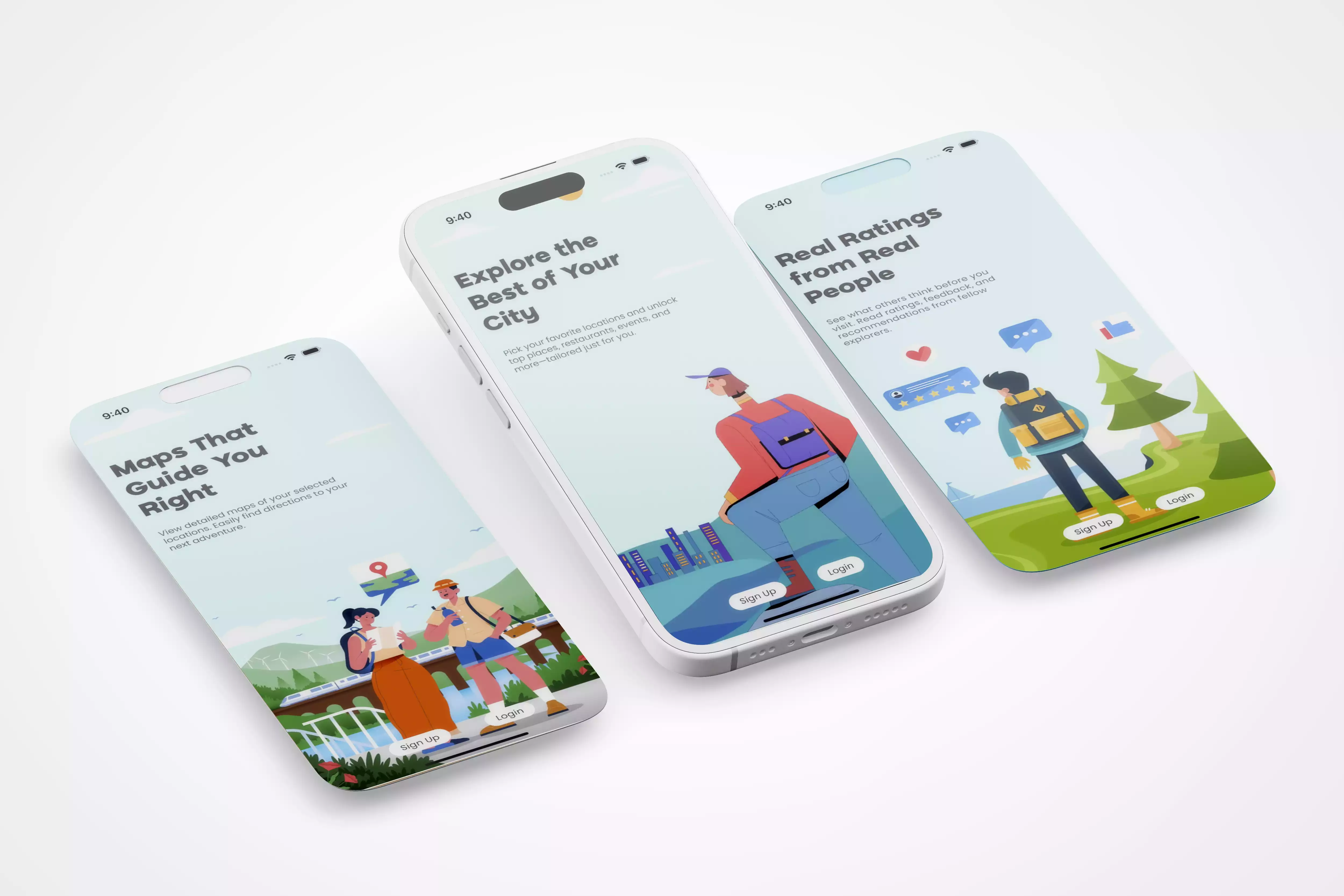
The onboarding sequence was designed as a progressive introduction — each screen revealing one aspect of the app's core value before asking the user to do anything. The goal was to build anticipation and trust before the sign-in step:
- Welcome Screen — introduces CitiGuide's core promise: helping users discover top restaurants, events, and spots tailored to their interests. Sets the visual tone for the entire app with a modern, confident aesthetic
- Maps & Navigation Screen — highlights the app's location and directions capability, showing users they can view interactive maps and follow guided routes to any destination with ease
- Community Ratings Screen — emphasises the trust layer built into the platform: real ratings and reviews from other explorers, helping users make informed decisions before visiting a place
Each onboarding screen was crafted to stand alone visually while forming a coherent narrative arc — by the time users reach the sign-in screen, they already understand what CitiGuide does and why it matters to them.
Authentication & Account Management
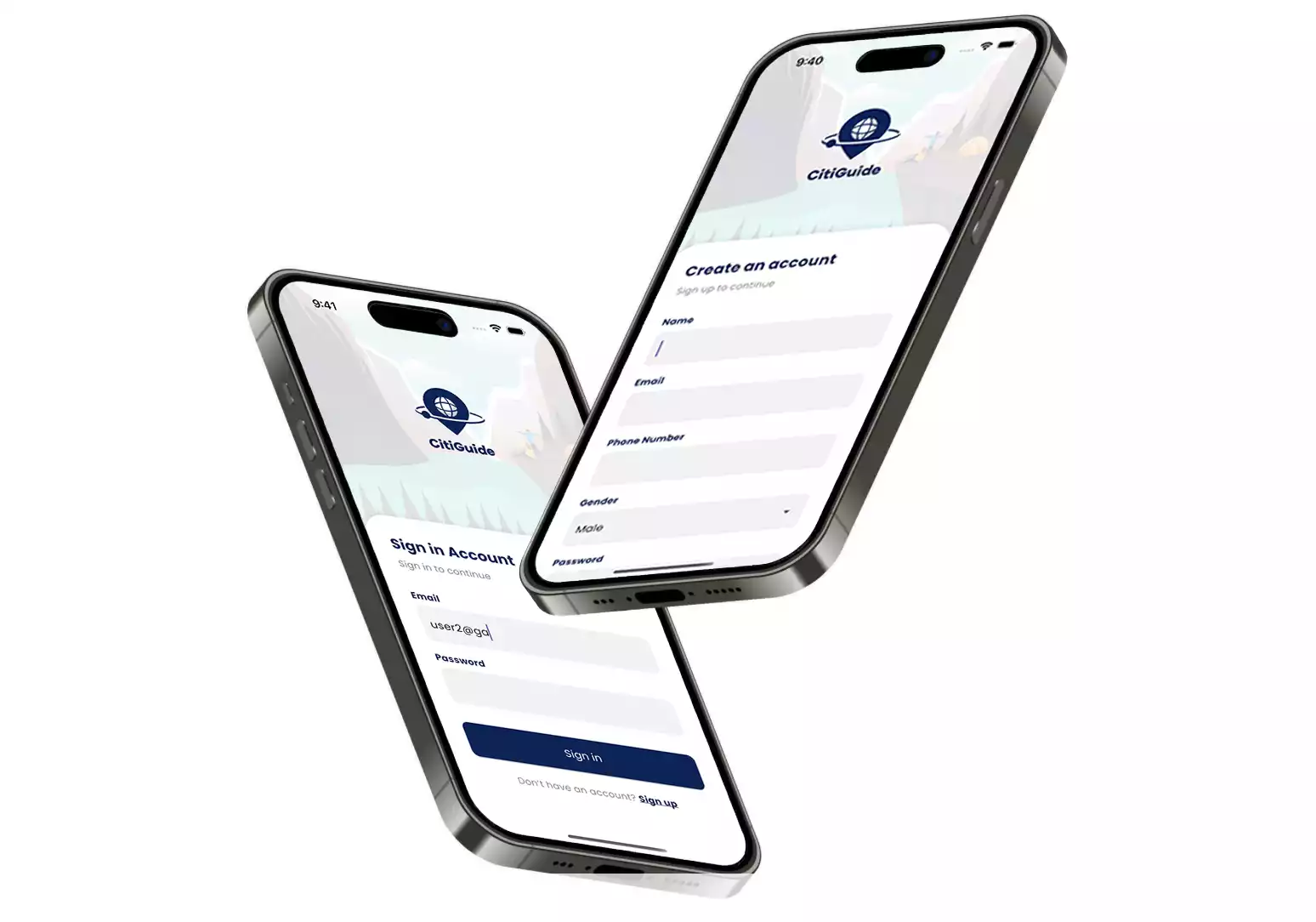
Authentication was handled using Supabase Auth, providing a secure and scalable identity layer without the overhead of building a custom backend authentication system:
- Login Screen — returning users sign in with their registered email and password through a clean, minimal interface. Supabase Auth handles credential verification securely, with fast response times that keep the login experience smooth
- Sign Up Screen — new users create an account by entering their full name, email address, and password. Input validation is applied client-side before submission, reducing unnecessary server calls and improving form responsiveness
- Both screens follow the same visual language as the onboarding flow, ensuring the transition from browsing to registering feels seamless rather than abrupt
Personalisation & City Selection
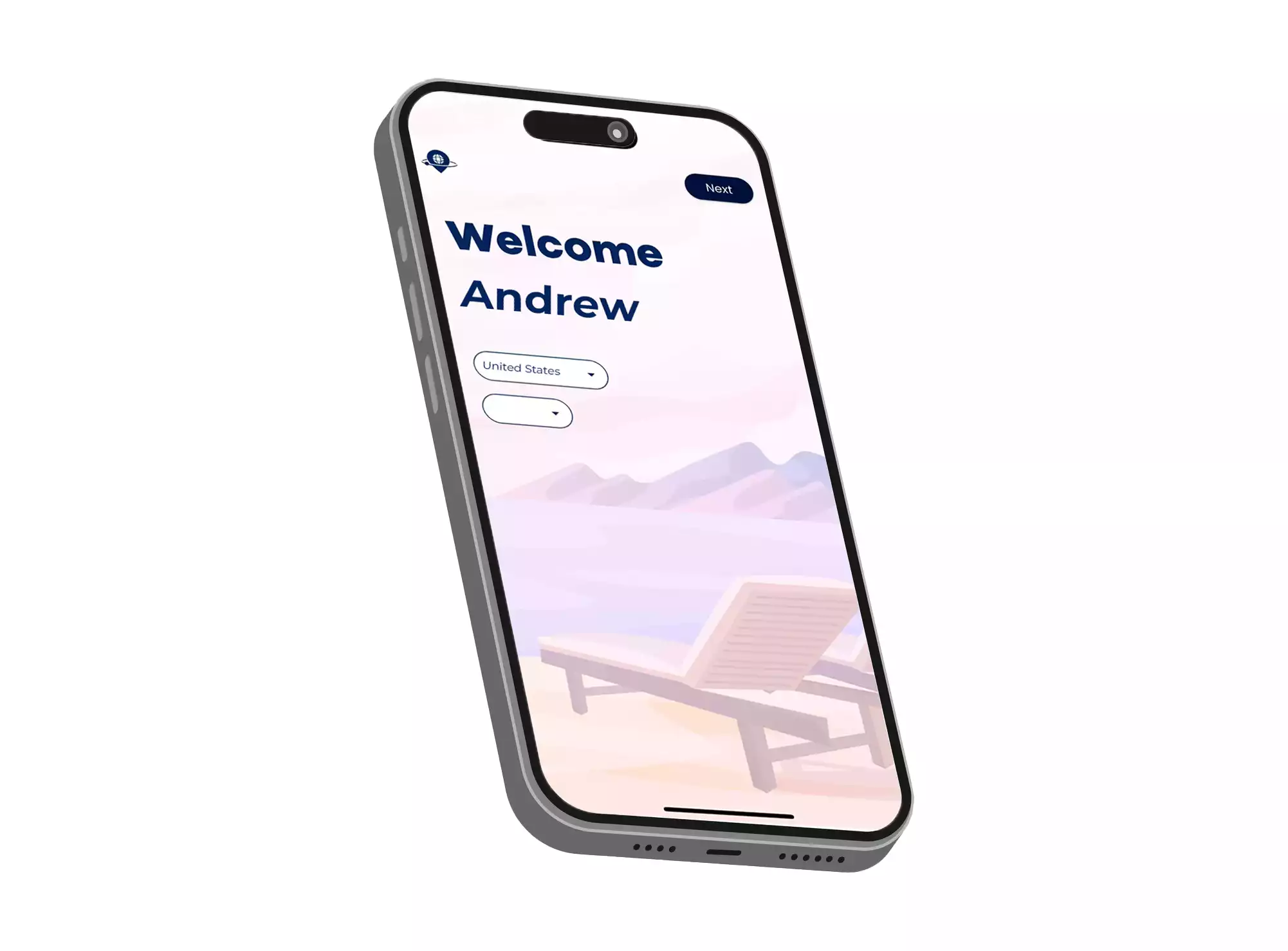
Immediately after signing in, users are welcomed by a personalised greeting screen that prompts them to select their country and city. This single step unlocks the full contextual power of the app:
- Country and city selection is presented via intuitive dropdown menus and searchable input fields, making the process fast even for users unfamiliar with the app
- Once a city is selected, the app tailors all subsequent content — attractions, maps, categories, and reviews — to that specific location, creating a genuinely local experience
- The selection is stored against the user's profile in Supabase, so returning users land directly in their city without needing to repeat the process
Home Screen & Discovery
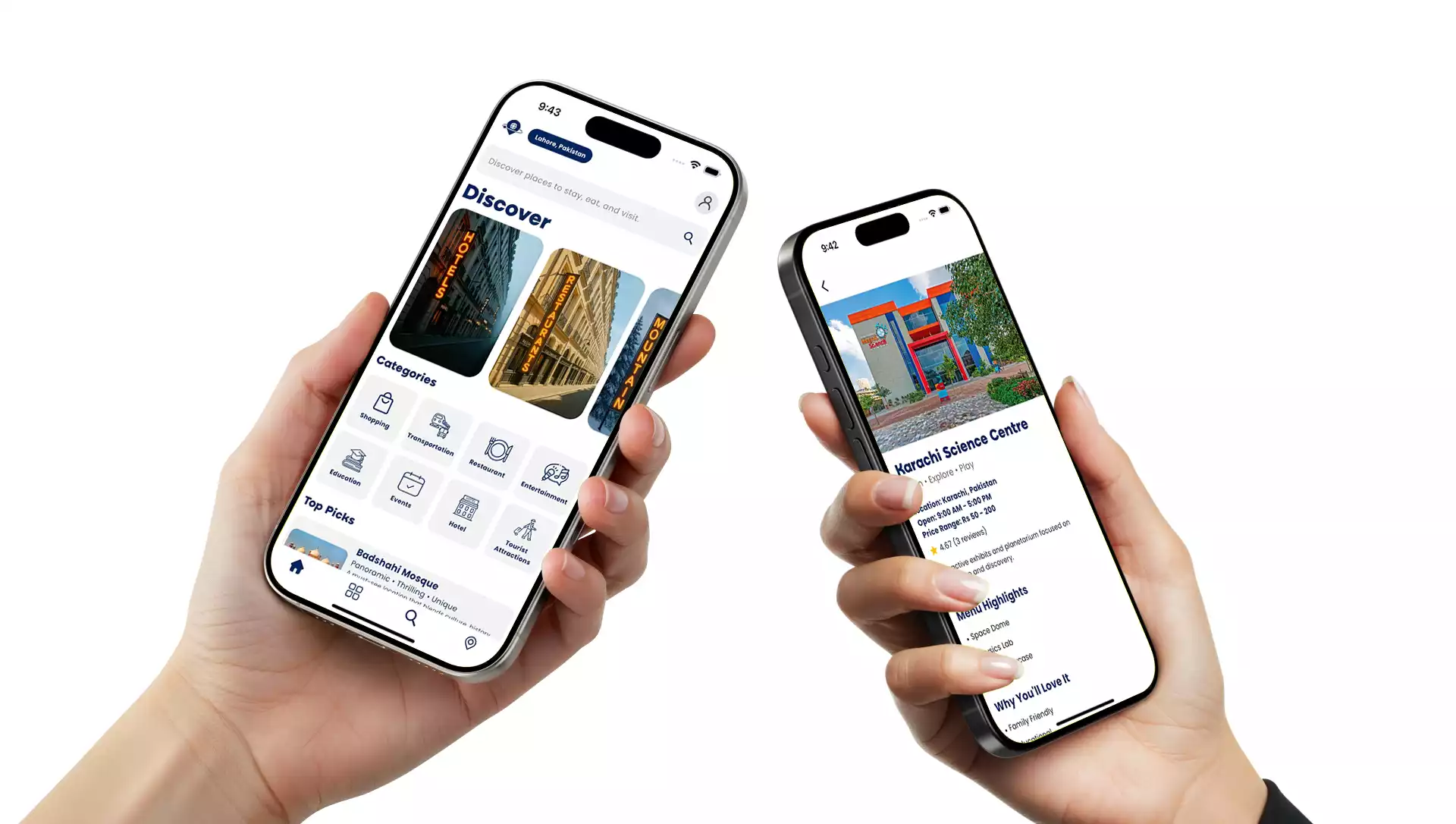
The Home screen functions as the central hub of the CitiGuide experience — the point from which all exploration begins. It was designed to present rich local content at a glance while keeping navigation fast and uncluttered:
- A prominent search bar at the top of the screen allows users to instantly query places, restaurants, landmarks, or services within their selected city
- Curated content sections surface recommended locations, popular categories, and top-rated spots — giving users immediate discovery value without requiring a search query
- The layout is clean and scroll-friendly, designed for one-handed mobile use with well-spaced touch targets and clear visual separation between content areas
Place Detail & Community Reviews
Each location in CitiGuide has a dedicated detail screen that consolidates everything a user needs to make a confident decision about visiting:
- The place name, imagery, and description are presented clearly at the top, giving users immediate context about the location
- An embedded map view shows the exact location, allowing users to orient themselves and plan their route before leaving the app
- User ratings and reviews from the community are displayed prominently, providing authentic social proof and helping users gauge quality based on real experiences rather than marketing copy
- The detail screen is accessible from both the Home screen and search results, keeping the path from discovery to decision consistently short
Technical Implementation
CitiGuide was built using a modern, cross-platform stack designed for performance, scalability, and developer efficiency:
- Flutter (Dart) — the entire frontend UI was built in Flutter, enabling a single shared codebase to produce native-quality experiences on Android, iOS, and web simultaneously. Flutter's widget system allowed for precise, pixel-consistent design implementation across all screens
- Supabase Authentication — email and password-based auth powered by Supabase, handling user registration, login, session management, and secure token handling out of the box
- PostgreSQL via Supabase — all application data — places, reviews, ratings, user profiles, and city selections — is stored and queried through Supabase's PostgreSQL database with real-time capabilities
- Supabase Storage — place images and user-uploaded content are managed through Supabase Storage, with access policies ensuring data integrity and appropriate visibility controls
- The app is deployable to both mobile app stores (Android and iOS) and as a Flutter Web application, giving the client flexibility in how and where the product is distributed
Outcome
CitiGuide demonstrates the full capability of Flutter and Supabase working in combination to deliver a polished, production-grade mobile application. The project resulted in:
- A complete, cross-platform mobile application ready for deployment on Android, iOS, and web from a single Flutter codebase
- A thoughtfully designed onboarding and authentication flow that communicates value clearly and removes friction from the sign-up process
- A fully personalised city experience driven by user location preferences and backed by a scalable Supabase data layer
- A community review and ratings system that builds genuine trust between users and the places they discover
- Real-time maps and guided directions integrated directly into the place detail flow, keeping the exploration experience contained within the app
CitiGuide is a lightweight yet powerful application that turns city exploration into a seamless, informed, and personal experience — demonstrating what thoughtful mobile design and a well-chosen backend can achieve together.